Rule Implementation
The creation of a rule consists of two different steps: Writing the actual Python code (also referred to as a ‘code blob’) and configuring the rule within the platform such that it can be used within flows. Before we can get started writing a new rule, one needs to think first of what the rule configuration should look like and do some preparation of the idea of the rule for the code blob itself. These two aspects are described below before we dive into the actual rule writing.
Rule code blobs
In the Energyworx platform, the code for the rules is provided as a code blob in the rule configuration.
Just like with coding anywhere else, creating a rule requires some preparation: What is the purpose of this rule? Where do we need it? Should this rule be one that is generic and can be used in many flows; or is it going to be very specific to a business process and can only be used in one flow? Does this rule depend on other rules or is it stand-alone? Rules preferably should only have a single purpose/goal, similarly to how one should design Python functions. After all, flows are created to execute a single business process and its rules each perform a single step towards achieving that process.
Another important detail about developing rules is to take into account how flows treat rules and how data is transferred between rules. What effect do sequences and source channels configured in the flow design have on a rule? How does the order of rules within the flow design affect your rule? Is the flow triggered on its own; triggered upon ingestion by a transformation configuration; triggered by a trigger schedule; or triggered by a different flow via the chain_flow rule?
Once these questions have been answered, we can start writing the actual rule code blob. Writing a rule code blob requires us to pick the class that is best suited for what we want to write. Each of these classes has its own page with a description of what we can and cannot do within that class, and how such a rule should be structured. Below is the list of these classes and a short description of what they generally are used for:
AbstractRule: Used basically for all rules that do not require the usage of any other rule class.AbstractTransformRule: Used for all transform rules. More limited than anAbstractRuledue to the scope in which transform rules are used.
Now that we have done all the preparation for creating a rule, let us write one. To cover the basics, we will be writing a basic rule using AbstractRule. The AbstractRule class is the default base class to use for writing rules.
Below is a description of what generally the structure of a rule should be; what methods and attributes you have access to within AbstractRule; and advice on specific design choices to make.
General imports required for this class:
    import pandas as pd
    from ewx_public.flow_rule import FlowRule
    from ewx_public import RuleResult, FlowCancelException
The legacy imports (from energyworx.rules.base_rule import AbstractRule) are still supported on the platform. See ewx-public Package for the full migration guide.
General structure
Below is an example of the general structure of a rule:
    import pandas as pd
    from ewx_public.flow_rule import FlowRule
    from ewx_public import RuleResult, FlowCancelException


    class MyFirstRule(FlowRule):
        def prepare_context(self, par1, par2, **kwargs):
            // Your code for Prepare context here
            return {}

        def apply(self, par1, par3, **kwargs):
            // Your code for the implementation of the rule here
            return RuleResult()
Despite this example being only 13 lines long, there are several key structures in it that are important for writing a rule properly. So, let us go over them.
First of all, the name of the class here is set to MyFirstRule. As stated in the section on Rule Configurations, the technical name set for the rule configuration determines what the name of the rule class in the code blob should be. In this particular case, the technical name of the rule configuration using this particular rule class would be my_first_rule. Basically, the name of the rule class should always be the technical name of the rule configuration it is used in, but in camel-case instead of snake-case. If this is not set up correctly, the code blob cannot be stored in the platform (neither through the console nor the API).
We can also see that this rule class inherits the AbstractRule base class. This is also mandatory. Rules stored as a code blob in the platform must inherit a variable named AbstractRule or AbstractTransformRule. The platform does not check whether these variables are also in one way or another references to the actual base classes with those names. So, for example, the following is allowed by the platform as well:
    from my_abstract_base_class import MyAbstractBaseClass as AbstractRule


    class MyFirstRule(AbstractRule):
        pass
Of course, if the MyAbstractBaseClass does not inherit AbstractRule, then executing this rule will fail. Generally speaking however, there is no need to not use either AbstractRule or AbstractTransformRule.
There are two methods defined in the rule: prepare_context and apply. Both of these methods serve a very specific role and will be discussed more in depth later. But, a brief description of them would be:
- prepare_context: Prepares the “context” in which this rule should be executed. This involves checking if the rule can be executed at all (checking the state of the datasource); determining what other datasources are necessary for this rule; retrieving tags; etc.
- apply: Applies the action defined in this rule. This involves performing all steps necessary for achieving this action and returning the result of said action.
Something that should also be noted is the arguments that both of these methods take. Every rule parameter that is configured in the rule configuration (see rule parameter) will be provided as a keyword argument to both of these methods, using the technical name that was set for that rule parameter. For that reason, it is a good idea to make sure that the signatures state which arguments each requires for their own execution, and collect the remaining arguments in **kwargs. So, as shown in the example above, we state here that prepare_context needs par1 and par2 for proper execution; and apply needs par1 and par3. Writing the signatures this way shows a clear intent on what arguments that method requires, even if it is provided more of them. It also allows for easier debugging if you forget to set that parameter in the rule configuration.
Given the importance of the two methods, we will dive into their meaning; purpose; and structure deeper now.
Abstract rule methods
There are two methods within AbstractRule that are always attempted to be called by the internal rule framework whenever a rule is executed, which are prepare_context and apply. While overriding prepare_context is optional; overriding apply is mandatory as otherwise its execution will raise a NotImplementedError.
Note: prepare_context methods of all rules within a flow design are executed first, before all of the apply methods are executed. Simply put, the order of execution in the rule framework for a flow design is (sequences within flows have no influence on this):
... prepare_context1 -> prepare_context2 -> ... -> prepare_contextN ... apply1 -> apply2 -> ... -> applyN ...
Flows are always executed on a single datasource. In the remainder of the descriptions on this page, the datasource on which a flow is executed that uses a rule that we are describing, will be referred to as “this datasource”.
prepare_context
The purpose of the prepare_context method is to, as the name suggests, prepare the “context” in which the rule is executed later on in apply. This includes the following (non-exhaustive) list:
- Determining whether this datasource is in a state in which the rule can be executed.
- Determining what other datasources besides this datasource are required for proper execution of this rule (either for their channel data or their tags).
- Checking whether these other datasources are available and handling the situation when they are not.
- Retrieving tags from these other datasources if required.
Return value
The return value of prepare_context must always be a dict of string keys and any object as its values, with two exceptions: the keys named prepare_datasource_ids and prepare_datasource_tags. The first key is special in that it must be an iterable of datasource IDs for which you wish to retrieve channel/tag data within the apply method that is not this datasource. If you do not wish to use any datasources besides this one within apply, you can pass either an empty iterable to this key or not include the key at all. Something to note here is that all datasources loaded this way will not have their tags loaded within apply. If it is required for them to also have their tags available, the prepare_datasource_tags key needs to be set to True.
Note: All keys within the dict returned in prepare_context will be within the dict available as self.context in the apply method, but the two aforementioned special keys will not. If you require the datasource IDs passed to prepare_datasource_ids to be available in apply as well, return them as a different key in the context in addition to prepare_datasource_ids. So, for example, your return of the prepare_context method could be:
    return {
      'prepare_datasource_ids': ['<datasource_id_1>', '<datasource_id_2>'],
      'prepare_datasource_tags': True,
      'weather_station_id': '<datasource_id_1>',
      'other_additional_datasource_id': '<datasource_id_2>',
      'some_other_info': <some_object>,
    }
Here, I required the preparation of two additional datasources (with their tags) for later in apply: A weather station datasource and another datasource with some info. I passed both of their IDs to prepare_datasource_ids and also included them separately in the dict, such that in apply, I can retrieve both IDs and I know which one is meant to be used for which.
Available attributes
self.datasource: The datasource model of this datasource. Datasource models behave mostly like normalDatasourceobjects. Below is a non-exhaustive list of attributes that are commonly used here.self.datasource.get_channel_by_classifier(<channel_id>): Retrieve the Channel object of given ID attached to this datasource. Mostly used for checking if this datasource has a specific channel.self.datasource.get_latest_tag_version(<tag_name>): Retrieve the latest version of a tag from this datasource with a specific name.self.datasource.get_active_tag_versions(<tag_name>): Retrieve all active versions of a tag from this datasource with a specific name.self.datasource.get_all_tag_versions(<tag_name>): Retrieve all versions of a tag from this datasource with a specific name.self.datasource.id: The ID of this datasource.self.datasource.timezone: The timezone of this datasource as a string, e.g., 'Europe/Amsterdam'.self.destination_column: The destination column/channel of the sequence this rule appears in. If this is a datasource flow, the value isNone.self.flow_timestamp: The timestamp of the start of this flow’s execution.self.sequence_index: The index of the sequence this rule appears in.self.source_column: The source column/channel of the sequence this rule appears in. If this is a datasource flow, the value isNone.
Available methods
The available methods are described in detail in Rule framework functions
Special cases
Below is a list of things that have a special/limited behavior.
type(self.datasource): The type ofself.datasourceinprepare_contextdiffers from the one inapply. The one inprepare_contextis of typeenergyworx_services.domain.model.DatasourceModel. The biggest difference between this class and the one used inapplyis that this class can create channels, but not tags.self.flow_timestamp: Theself.flow_timestampis adatetime.datetimeobject that always shows the timestamp in UTC, but does not have the UTC timezone associated with it. Therefore, when using it for anything you might want to doflow_timestamp = pd.Timestamp(self.flow_timestamp, tz='utc')before attempting to use it.- If you add a logger to the prepare_context, it will only present this result if the prepare_context was successful. If the prepare_context fails with an error, the logging is not returned to the user.
apply
The purpose of the apply method is to, as the name suggests as well, “apply” the action as described in the rule to the state of the flow instance within the prepared context. This means modifying the data that is currently stored in this flow instance in such a way that the action from this rule can be considered complete. The apply method may perform some of the functions given in Rule framework functions
Return value
The return value of apply must always be an instance of the RuleResult class (from energyworx.domain import RuleResult), even if you wish to return nothing, in which case you return an empty rule result, i.e. RuleResult(). The RuleResult class takes multiple different arguments, each with a different purposes. Out of the six possible arguments, I will describe the two most important ones: result and flow_metadata_properties.
The result argument is the most commonly used argument from RuleResult and takes either a pd.Series or a pd.DataFrame object. Depending on which two of these is returned, the platform will interpret the result differently. Returning a pd.DataFrame object will simply replace the self.dataframe object with the returned dataframe of channel data for all rules that follow this one. Returning a pd.Series object will instead make the platform associate the returned series with the channel set as self.destination_column (if timeseries) or self.source_column (if annotations) for this rule.
Choosing to return one or the other depends on your focus for this rule. Returning a pd.DataFrame object allows a single rule to return timeseries data for many channels at once. However, it is required for you to know what the names of all these channels are in advance, be it given through flow properties by previous rules; stored on datasource tags; hard-coded in the rule; or other means. Returning a pd.Series object on the other hand allows a single rule to return timeseries data for a channel (self.destination_column) that can be set outside of the rule itself. This makes the rule more flexible in that it does not need to know what the destination channel is outside of a flow design.
Keep in mind that returning any data this way does not make that data persistent. In order to do so, you have to use the store methods named self.store_timeseries and self.store_annotations, which can directly take a pd.Series or a pd.DataFrame object within a rule and make it persistent. More information on this methods can be found in the article on Timeseries Storage.
The flow_metadata_properties argument takes a dict of string keys and string values, where the string keys must be written in snake-case. The dicts that have been given to this argument from all rules are combined into a single dict, whose contents will be stored as metadata of this particular flow instance. This will then be visible on the datasource and can also be queried on in BigQuery (table:flow_metadata). For example, below I am looking at a specific flow that was ran on 2023-07-04T09:28:51 and it had some flow metadata properties as a result, which are reported here as well.
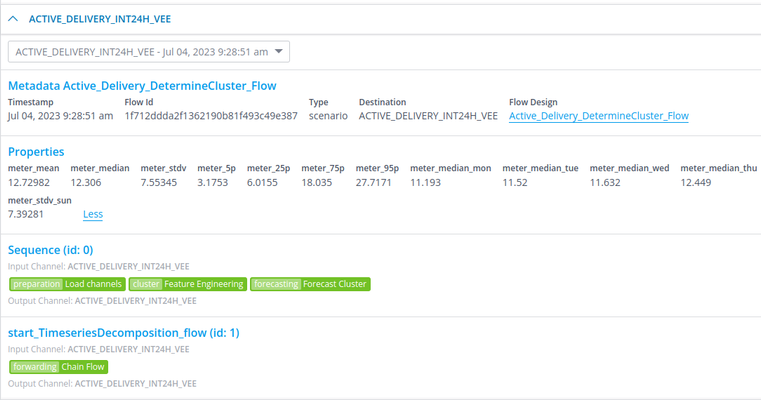
The purpose of this is to be able to store data other than timeseries data that also does not deserve a place in the tags. For example, you may want to report on the number of gaps that were found during the VEE process. As this number will change with every execution of the VEE flow, it becomes very quickly undoable to store this number on a tag. Especially as it becomes hard to associate the number with a specific flow execution.
Available attributes
self.channel_data: A pandas DataFrame object containing all the timeseries data that were results of previous flow(s) and ingestion(s). This includes basically theself.dataframeof a previous flow in the chain and all data from all channels that were ingested if this is an ingestion flow.self.context: The dict that was returned inself.prepare_contextwithout theprepare_datasource_idsorprepare_datasource_tagskeys.self.data_filter: A pandas Series of booleans, stating for each timestamp inself.dataframewhether the rules filtered for this rule created an annotation on that timestamp. Used mostly within VEE flows.self.dataframe: A pandas DataFrame object containing all the timeseries data considered part of this flow’s execution. Its contents are modified in several different ways, explained below:- Rule results: As explained above, the
RuleResultreturned by any previous rules will modify the contents of this DataFrame. Returned DataFrames replaceself.dataframewhereas returned Series add toself.dataframe. - Destination columns: Destination columns of a sequence are automatically added to
self.dataframefor the first sequence they are used in. - And of course, as
self.dataframeis available within a rule, one could also modify it directly. This modification is however lost after the rule ends.
- Rule results: As explained above, the
self.datasource:Datasourceobject of this datasource.self.destination_column: The destination column/channel of the sequence this rule appears in. If this is a datasource flow, the value isNone.self.flow_properties: A dict which any rule can write any object to. Useful for sharing information between rules that is not timeseries. Theself.flow_propertiesdict is also automatically copied over to any chained flows, making it useful for sharing information between chained flows. NOTE: Only basic data types can be stored here (strings, numbers, lists, dicts). Storing complex objects here will lead to serialization issues when chaining flows.self.flow_timestamp: The timestamp of the start of this flow’s execution.self.prepared_datasources: A dict of{<datasource_id>: <datasource_obj>}of all datasources that were prepared for this specific rule. Contains all datasources that were returned as part ofprepare_datasource_idsinself.prepare_context, including this datasource.self.rule_logger: A logger to be used by rules. Any logs created with this logger will appear in the Audit Events under their own separate header.self.sequence_index: The index of the sequence this rule appears in.self.source_column: The source column/channel of the sequence this rule appears in. If this is a datasource flow, the value isNone.self.timeseries_service(New in 24.01): ATimeseriesServiceobject whose sole purpose is to load timeseries for the rule. See Timeseries Loading for an extensive description of its functionality.
Available methods
See available methods in this page rule framework functions.
Datasource objects
The datasource objects have the following attributes:
    class Datasource:
        id: str
        channels: list[Channel]
        tags: list[Tag]
        name: str
        description: str
        timezone: str
        filter: str
        classifier: DatasourceClassifier
- id: The ID of this datasource.
- name: The name of this datasource.
- channels: a list of the chanels that belong to this datasource
- timezone: The timezone of this datasource as a string, e.g.,
'Europe/Amsterdam'. - filter: The filter parameter of a Datasource which is a Virtual Datasource. This field won't be used for standard datasources.
- classifier: the datasource classifier object.
The Channel class looks like this:
    class Channel:
        id: str
        name: str
        description: str
        classifier: ChannelClassifier
        is_source: bool
        flow_configuration_id: int
        properties:list[KeyValueType]
- id: The id of the channel.
- name: The name of the channel.
- description: The description of the channel.
- classifier: The channel classifier of this channel.
- is_source: A boolean indicating if the channel is a source channel or not. That is configured in the Transformation configuration.
- flow_configuration_id: The id of the flow configuration that is executed on this channel on this datasource.
- properties: a list of KeyValueType objects that can be set to dynamically configure this channel on the corresponding datasource.
The Tag class looks like this:
    class Tag:
        tag: str
        description: str
        valid_from: datetime
        properties: list[KeyValueType]
        removed: bool
        version: datetime
        is_active_scd: bool
        created_by: str
- tag: the name of the tag.
- description: the description of the tag.
- valid_from: the valid from of the tag.
- properties: a list of KeyValueType objects that contain the properties of this tag.
- removed: boolean indicating if this version of this tag is removed.
- version: the version of this tag.
- is_active_scd: boolean indicating if this tag is of Slowly Changing Dimensions (SCD) type.
- created_by: a string with the id of the user that created the tag ('system' if the tag is created progreamatically in a rule in a flow or in a transformation configuration)
For more details about tags you can check Tags.
User exceptions
Rules can also trigger exceptional events that causes specific behavior on the flow where they are executed. These are available as python Exceptions that can be used at any point in the rule code. For a summary of available exceptions and their handling you can take a look at User Flow Exceptions.
Nested rules
Rules may use other custom rules, in a manner what we call Nested rules.
A Nested Rule can use all the methods defined in the AbstractRule as long as you pass to the instance’s constructor all the necessary arguments. Here's an example:
import logging
from energyworx.domain import RuleResult
from energyworx.rules.base_rule import AbstractRule
from test_nested_rule_call import TestNestedRuleCall
logger = logging.getLogger()
class TestNestedRule(AbstractRule):
    def apply(self, **kwargs):
        rule_test_nested_rule_call = TestNestedRuleCall(self.datasource, rule_context=self.context, dataframe=self.dataframe, detectors=self.detectors,
                                                      source_column=self.source_column, destination_column=self.destination_column, sequence_index=self.sequence_index,
                                                      data_filter=self.data_filter, billing_account_id=self.billing_account_id, namespace=self.namespace,
                                                      flow_properties=self.flow_properties, additional_task_details=self.additional_task_details,
                                                      prepared_datasources=self.prepared_datasources, sink_data=self.sink_data, tag_mutations=self.tag_mutations,
                                                      query=self.query, super_query=self.super_query, datasource_service=self.datasource_service,
                                                      super_datasource_service=self.super_datasource_service, timeslice_service=self.timeslice_service,
                                                      channel_classifier_service=self.channel_classifier_service, trigger_service=self.trigger_service,
                                                      annotation_blacklist=self.annotation_blacklist, annotation_whitelist=self.annotation_whitelist,
                                                      channel_data=self.channel_data, annotations_data=self.annotations_data, rule_logger=self.rule_logger,
                                                      flow_timestamp=self.flow_timestamp, user_id=self.user_id)
        rule_test_nested_rule_call.apply()
        return RuleResult()
TestNestedRuleCall above is only an example of a rule
NOTE: The platform only supports imports in the format from rule_a import RuleA if you want to import multiple classes you must use the format from rule_a import RuleA, OtherClass. Imports in a different format may lead to errors and inconsistent behaviour.
NOTE: The platform only supports one import level. That means you can’t nest a rule that imports another rule. Also, you can’t call a rule that needs prepare_context, since this method is executed in the platform for all rules of a flow before calling their apply method.
Rule Inheritance
Rules are designed to inherit properties and methods from other defined rules. This pattern allows you to create specialized rules by using an existing rule as a base class. This is different from nesting one rule within another as described above.
How Inheritance Works:
When Rule B inherits from Rule A:
-
Automatic Inclusion: Rule B automatically gains all the methods and attributes defined in Rule A without needing to explicitly call or reference them.
-
Method Overriding: You can override any method from the base rule (Rule A) simply by redefining a method with the same name in the derived rule (Rule B). You can choose to call the base method using super() if you want to extend its functionality instead of replacing it entirely.
-
Multi Class Inheritance: You can inherit multiple classes in a rule. However, you must be careful to avoid redundant inheritance, which occurs when you inherit from both a base class and a subclass of that same base class - this is not supported by Python. For instance:
class A:
  pass

class B(A):
  pass

class C(A):
  pass

# This will fail
class D(A, C):
  pass

# This will work
class D(B, C):
  pass

# This will fail
class E(C, D):
  pass
Special cases
Below is a list of things that have a special/limited behavior.
type(self.datasource): The type ofself.datasourcein apply differs from the one inprepare_context. The one inapplyis of typeenergyworx.domain.Datasource. The biggest difference between this class and the one used inprepare_contextis that this class can create tags, but not channels.self.flow_timestamp: Similarly toprepare_context, this timestamp has no UTC timezone associated with it despite always being in UTC.Tagargumentsversion/valid_from: Theversionandvalid_fromprovided to the creation of aTagobject only takedatetime.datetimeobjects, notpd.Timestampobjects. Furthermore, if thedatetime.datetimeobject has no timezone associated with it, it is assumed to be equal toself.datasource.timezone. This makes the previous point especially important, as usingself.flow_timestampas aversionorvalid_fromwould mean that the timestamp is interpreted as local timezone despite being in UTC.
However, if you instead create aTagobject usingTag.from_dict(), thenversionandvalid_fromare assumed to be in UTC timezone if they have no associated timezone.- Destination columns in
self.dataframe: If the destination column of a sequence has no entry inself.dataframeat the start of that sequence, it will be added to the DataFrame. Its contents will be a copy of the sequence’s source column data inself.dataframe. - Empty
self.data_filter: If no annotations were returned at all for any of the filtered rules that apply toself.data_filter, this Series can contain either onlyFalseor onlyTrue. So, when checking if there is anything to be filtered, it is usually better to check ifself.data_filtercontains onlyFalseorTrueusing something likeif all(self.data_filter) or not any(self.data_filter):and return if so.
There are a few other articles for specific functions from the rule framework:
- How to load timeseries in rules: Timeseries Loading
- How to store timeseries from rules: Timeseries storage
- How to create tasks from rules: Task Creation
Best Practices
datetime.now, datetime.utcnow, and self.flow_timestamp()
The use of datetime.now and datetime.utcnow can lead to inconsistencies when creating or searching for data between rules that depends on these values and hindered performance in execution. A better approach it to use self.flow_timestamp. This is an attribute that holds the value when the flow was started.